You're about to launch a new campaign. The budget is approved, the landing pages are live, and your client expects results within the first 30 days. There's just one problem — you have no idea what your top 3 competitors are already running. What messaging are they using? What offers are live? Which platforms are they spending on?
If you launch without knowing this, you're spending $5K–$50K/month flying blind.
Every experienced PPC specialist does competitor ad research before going live. The difference is how efficiently they do it. Most still do it the slow way — googling competitor names, screenshotting SERPs, saving ads to random folders that nobody ever opens again. There's a faster, more systematic approach that uses Google's own Ads Transparency data and gives you every active ad for any domain in seconds.
Here's the exact workflow, step by step.
Why Competitor Ad Research Matters Before Every Campaign Launch
Skipping competitor research before launching a Google Ads campaign is like writing ad copy in a vacuum. You might nail it by accident, but more often you'll waste budget discovering what the market already knows.
Here's what you gain from 10 minutes of research:
What 10 Minutes of Research Gives You
- Positioning gaps. If four competitors all lead with "Start Free Trial" and none mention "No Credit Card Required," that's your angle. If everyone talks about features, lead with outcomes. Gaps in competitor messaging are your lowest-effort wins.
- Lower CPCs. Running identical messaging to your competitors means you're fighting for the same impression with the same hook. The result: higher CPCs, lower CTR, and ad fatigue across the auction. Differentiated copy wins cheaper clicks.
- Offer intelligence. Before you write a single headline, know what discounts, guarantees, and CTAs are already live in your market. There's no point running "20% Off" if three competitors already offer 30%.
- Platform allocation clues. If competitors run heavy on Display but ignore YouTube, that's either a signal (they tested and it didn't work) or an opportunity (they haven't tested it yet). Either way, it's data you need.
The Problem with Manual Competitor Ad Research
The traditional workflow looks like this: Google the competitor's name. Look at the ads. Screenshot. Paste into a Google Doc. Repeat for the next competitor. It takes 20–30 minutes per domain, and you only see what's live right now, in your location, on Search.
Here's what you miss entirely:
- Display ads (banners across the Google Display Network)
- YouTube video ads
- Shopping product ads
- Ads running in other countries
- Ads that ran last week but aren't live today
Google's Ads Transparency Center exists — it's free, public, and contains every ad any verified advertiser runs on Google. But browsing it manually is painfully slow. One ad at a time, no bulk view, no way to filter by platform, no export. The data is there. The efficiency isn't.
That's where the Google Ads Transparency extension comes in.
How the Google Ads Transparency Extension Works
The extension is a free Chrome tool that connects directly to Google's official Ads Transparency Center API. Instead of clicking through ads one by one, you enter a domain and get every ad they're running — across Search, Display, YouTube, Shopping, Google Play, and Google Maps.
The key difference is speed. The extension uses API-based extraction, not page scraping, making it 10–15x faster than browsing the Transparency Center manually. A pull that would take 20 minutes by hand takes seconds.
It supports 238 countries, so you can research competitor ads in any market Google operates in. All data is stored locally on your machine — nothing is uploaded to external servers. And it's completely free.
Step-by-Step: How to Pull Every Competitor Ad in 60 Seconds
Let's walk through a real workflow. Say you manage PPC for a project management tool and you want to see what monday.com is running.
Enter the Competitor Domain
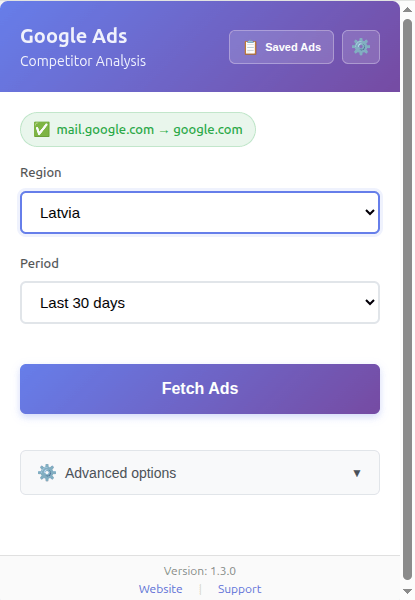
Click the extension icon in your Chrome toolbar to open the popup. The extension automatically detects the domain of the website you're currently on. If you're on a different site, you can navigate to the competitor's website first, or simply open the competitor's site in a new tab.
Set Region, Date Range, and Platform
Before fetching, configure three filters:
- Region. Select the country you're competing in from the dropdown — US, UK, Australia, Germany, or any of 238 supported countries. The default is "Anywhere," which pulls ads across all regions. For competitive analysis on a specific campaign, narrow it to your target market.
- Period. "Last 30 days" is the default and works well for active campaign analysis. Use "Last 7 days" to see only fresh ads, or "Custom Range" if you need a specific window (e.g., a competitor's Black Friday push from last November).
- Platform. This sits under "Advanced options." You can filter by Search, Display, YouTube, Shopping, Google Play, or Google Maps. For your first pull, leave it on "All Platforms" — you'll filter in the viewer later. If you only care about text ads for your RSA research, narrow to "Search" here to save time.
Hit Fetch and Watch the Results Come In
Click "Fetch Ads." The extension pulls ads in the background and shows a progress indicator with the running count. A typical pull returns anywhere from 50 to 500+ ads, depending on how actively the competitor advertises.
The process takes seconds, not minutes. You can keep browsing while it works.
Explore Results in the Ads Viewer
Once the fetch completes, click "Saved Ads" in the extension popup to open the full viewer. This is where the real analysis happens.
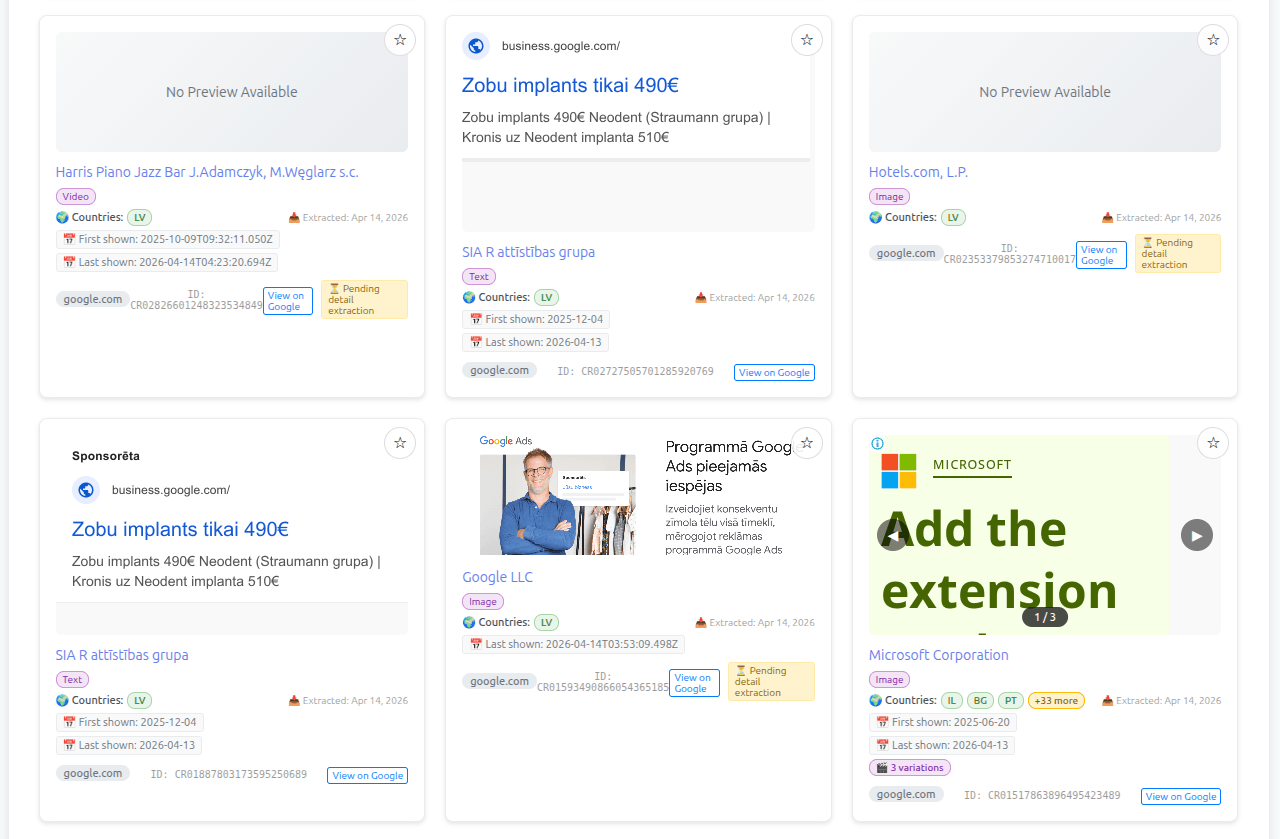
The grid view shows all pulled ads as visual cards. Each card displays the key information you need at a glance:
- Ad creative — thumbnail preview of the actual ad your competitor is running
- Advertiser name — the verified advertiser behind the ad
- Format badge — Text, Image, Video, or other format type
- Countries — which regions this ad targets (shown as country badges)
- First shown / Last shown dates — how long this ad has been running
- "View on Google" link — opens the ad on Google's Transparency Center for the official source
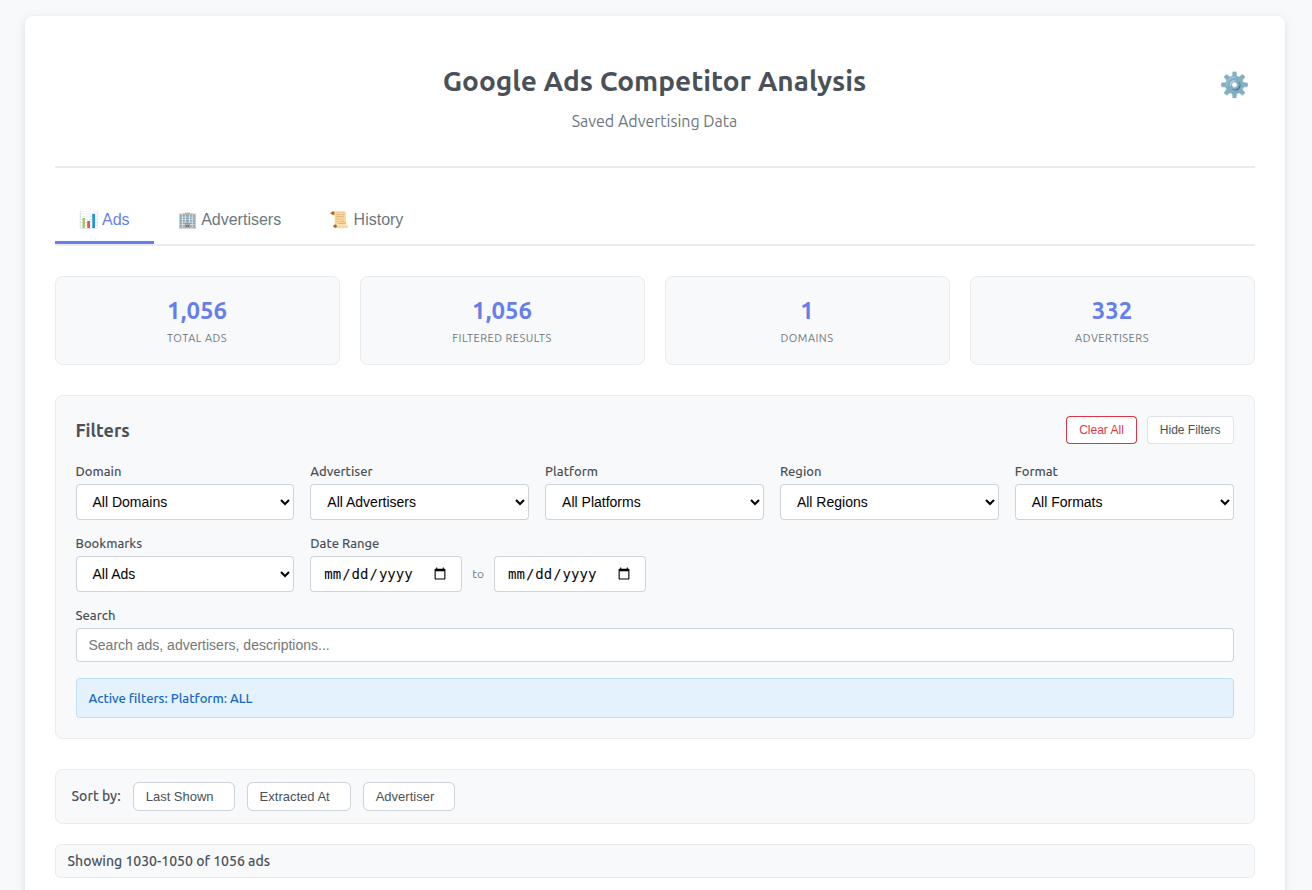
You can sort by "Last Shown," "Extracted At," or "Advertiser" to organize the results and quickly spot patterns across hundreds of ads.
What to Look for as a PPC Specialist
- What headlines are they testing? Look for patterns in the first 10–15 text ads.
- Which CTAs dominate — and which are absent? If 80% say "Start Free Trial" and nobody says "Book a Demo," that might be your angle.
- How many ad variations do they run? A competitor with 200+ ads and multiple variations per creative is likely testing aggressively.
- What offers are live? Look for pricing language — "from $X/mo," "X% off," "free for teams of 5."
Filter by Platform to See Where Competitors Spend
After the initial pull, use the viewer's filter bar to isolate ads by platform. This reveals where a competitor allocates their Google Ads budget — and where they don't.
- Search ads. Filter to see only text ads. These directly inform your RSA strategy — you'll see the exact headlines, descriptions, and CTAs they compete with in the auction. Look for headline patterns you can adapt and CTAs you can counter.
- Display ads. See their banner creatives, image sizes, and messaging angles. This is gold for GDN campaign planning — you'll know what visual styles and copy approaches dominate your competitive landscape.
- YouTube ads. See video ad thumbnails, titles, and descriptions. This reveals their video strategy without you having to watch hours of content. Note the format types — bumper ads, skippable in-stream, or discovery ads.
- Shopping ads. See product titles and images. This shows their feed optimization approach and which products they push hardest. Useful for e-commerce teams benchmarking against competitors.
The strategic insight: If a competitor shows 300 Search ads and only 5 Display ads, they're Search-heavy. Their GDN presence is thin. If it's the opposite — heavy Display, light Search — they're running awareness-first campaigns. This tells you where the competition is saturated and where you might find an opening.
Real Example: What You Learn from Pulling a Competitor's Full Ad Library
Let's say you manage PPC for a project management SaaS and you pull your top competitor's ads. Here's what a typical analysis reveals:
The Raw Data
- 180 active ads across 12 countries
- Heavy concentration in the US (90 ads) and UK (45 ads)
- Remaining ads spread across Canada, Australia, Germany, France, and others
CTA Analysis (Using the Viewer's Search Filter)
- "Start Free Trial" appears in ~60% of ads — their primary hook
- "See Pricing" used in ~25% — targeting bottom-of-funnel
- "Watch Demo" in ~10% — awareness play
- "Get Started Free" in ~5% — variation testing
Headline Patterns
- The dominant formula is [Feature] + for [Audience]: "Task Management for Remote Teams," "Project Tracking for Agencies," "Workflow Automation for Startups"
- Secondary formula: [Outcome] + [Proof]: "Ship 2x Faster — Trusted by 100K Teams"
Platform Distribution
- 150 Search ads, 20 Display ads, 10 Shopping ads, 0 YouTube ads
- Shopping ads are unexpected for SaaS — indicates they've listed on marketplace platforms
- Zero YouTube presence is a clear gap
Actionable Takeaways You Can Use Today
- Counter their CTA. Their saturation on "Start Free Trial" means the audience sees it everywhere. Differentiate with "No Credit Card Required" or "14-Day Free — Cancel Anytime." Same offer, different framing.
- Borrow their headline formula. The [Feature + Audience] pattern clearly works for them (they're running 180 ads with it). Test your own version with your features and your audience segments.
- Attack their YouTube gap. Zero video ads means zero competition on YouTube for your category keywords. Test 15-second bumper ads or short in-stream ads — CPVs will likely be low.
- Validate their geographic signal. Their heavy US/UK investment confirms those markets are profitable. If you're not advertising there, it's worth testing. If you are, this confirms you're in the right markets.
One competitor pull. Five minutes. Weeks of strategic direction.
How to Turn Competitor Ad Data into a Campaign Brief
Raw data is useless without a framework. Here's how to translate competitor ad intelligence into a campaign brief your team can execute on.
- Messaging map. List the top 5 angles or claims you found across competitors. For each one, ask: Can we match it? Can we counter it? Can we say something nobody else is saying?
- CTA playbook. Compile every CTA you found. Identify what's overused — that's where you differentiate. Identify what's underused — that's what you test. If everyone says "Start Free Trial" and nobody says "See It in Action," there's your experiment.
- Platform priority. Based on where competitors are active (and where they're not), decide your channel mix. High competitor density on Search with an empty YouTube landscape? That's a signal.
- Geographic signal. If competitors invest heavily in specific countries, the market is validated. If they're absent from a region, test cautiously — they may know something you don't, or they may simply not have tried.
- Headline formulas. Extract 3–5 headline patterns from competitor ads. Adapt them with your own value propositions. Don't copy — use the structure and plug in your differentiators.
Use This Template to Organize Your Findings
| Competitor | Top Angle | Main CTA | Platforms | Countries | Gap / Opportunity |
|---|---|---|---|---|---|
| Competitor A | Task management for teams | Start Free Trial | Search, Display | US, UK | No YouTube presence |
| Competitor B | All-in-one workspace | Get Started | Search | US, CA, AU | No Shopping, no Display |
| Competitor C | Replace 5 tools with 1 | See Pricing | Search, YouTube | US | YouTube = potential benchmark |
Stop Guessing, Start Researching
Every dollar you spend on Google Ads competes directly against someone else's dollar. The difference between guessing what works and knowing what the market already runs is a 60-second domain lookup.
Key Takeaways
- Competitor ad research prevents wasted budget by revealing positioning gaps, CTA saturation, and platform opportunities before you launch
- Manual research misses Display, YouTube, Shopping, and international ads — the Transparency extension pulls everything in seconds
- Filter by platform to find where competitors spend heavily and where they leave gaps you can exploit
- Turn raw ad data into a structured campaign brief with messaging maps, CTA playbooks, and headline formulas
- One competitor pull gives you weeks of strategic direction — do it before every campaign launch
The Google Ads Transparency extension gives you the same data Google makes public — organized, filterable, and exportable. No subscription, no external data storage, no manual screenshotting.
Install the Google Ads Transparency Extension and Pull Your First Competitor's Ads in Under a Minute
See every ad your competitors run across Search, Display, YouTube, and Shopping — for free. No signup required.
Add to Chrome — It's FreeKeep Reading
- Want a deeper dive into the Transparency Center? How to Use Google Ads Transparency Center to Spy on Competitor Ads (2026 Guide)
- Need to estimate competitor budgets? How to Estimate Competitor Google Ads Spend: What Actually Works
- Looking for competitor keywords? How to Find Competitor Keywords for Free: 7 Budget-Friendly Methods
Frequently Asked Questions
How do I see my competitor's Google Ads?
Use Google's Ads Transparency Center — it's free and public. The Google Ads Transparency extension automates this by pulling all ads for any domain in seconds, organized by platform, region, and format.
Is it free to see competitor Google Ads?
Yes. Google's Ads Transparency Center is completely free, and the Chrome extension that automates the research is also free. No paid subscription required.
Can you see competitor ad copy on Google?
Yes. Through the Ads Transparency Center (and the extension), you can see headlines, descriptions, calls-to-action, and creative images for any advertiser's Google ads across Search, Display, YouTube, and Shopping.
What's the difference between this and tools like SEMrush or SpyFu?
SEMrush and SpyFu estimate competitor ad data using their own crawling methods. The Ads Transparency extension pulls directly from Google's official data — the same data Google publishes publicly. It's free, uses real data (not estimates), and stores everything locally on your machine.